
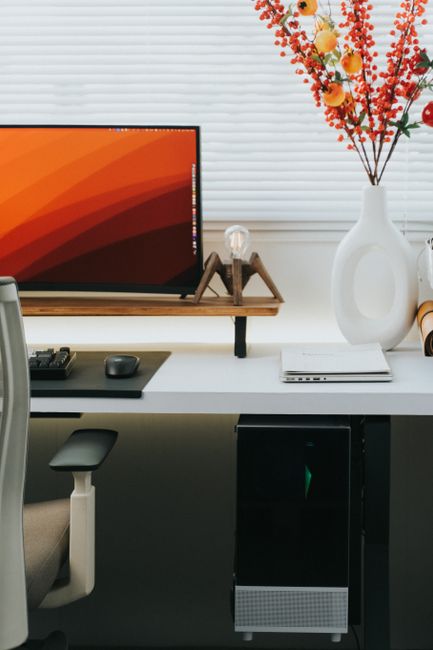
What makes a workspace spine-friendly?
A spine-friendly workspace supports a neutral posture, allows frequent movement, and keeps commonly used items within easy reach. The goal is not to hold the body rigidly in one “perfect” position, but to reduce prolonged strain while making comfortable movement easier throughout the day.
For residents of Plattsburgh, NY, work may take place in many settings: a home office, classroom, healthcare environment, workshop, vehicle, or shared office. Each setting creates different demands, but the same basic principles apply:
- The head should remain balanced over the shoulders.
- The shoulders should stay relaxed rather than lifted or rounded.
- The elbows should rest near the sides of the body.
- The lower back should be supported without being forced into an exaggerated arch.
- The feet should have stable contact with the floor or a footrest.
- Frequently used tools should not require repeated twisting, reaching, or bending.
Ergonomics is less about buying specialized equipment and more about arranging the work area so the body does not have to compensate all day.
How high should a desk and computer screen be?
The top of a computer screen should generally be near eye level, with the center of the screen slightly below eye height. This allows the eyes to look forward or slightly downward without repeatedly bending the neck.
A screen that is too low often leads to forward-head posture. A screen that is too high may cause the neck to tilt backward or encourage shoulder tension. Place the screen about an arm’s length away, then adjust the distance based on text size and visual comfort.
A desk should allow the forearms to rest roughly parallel to the floor while typing. The shoulders should not rise toward the ears, and the wrists should remain relatively straight. If the desk cannot be adjusted, a stable monitor riser, separate keyboard, or footrest may help create a better arrangement.
For laptop users, the built-in keyboard and screen create a common compromise: raising the screen makes the keyboard too high, while keeping the keyboard comfortable places the screen too low. If a laptop is used for several hours, an external keyboard and mouse can allow the screen and hands to be positioned separately.
Is sitting upright all day good for the spine?
No. Even good posture can become uncomfortable when held for too long. The spine and surrounding muscles are designed to adjust position, not remain frozen for hours.
A practical approach is to change position every 20 to 30 minutes. This may include standing briefly, walking to another room, shifting the chair position, or performing a few gentle shoulder and hip movements. Short movement breaks are often more useful than waiting until stiffness becomes severe.
Try pairing movement with ordinary work habits:
- Stand during a phone call when practical.
- Walk to refill water instead of keeping a large container within reach.
- Use a timer or calendar reminder for brief position changes.
- Alternate between sitting and standing if the work surface allows it.
- Place printers, files, or other supplies where they require occasional walking rather than repeated twisting.
A sit-stand desk can be useful, but standing in one position for long periods may also cause fatigue. Comfortable shoes, a cushioned floor surface, and regular weight shifting can make standing more manageable.
How should an office chair be adjusted?
A chair should support the pelvis and lower back while allowing the feet to rest securely. Begin with the seat height: both feet should be supported, and the knees should be about level with or slightly lower than the hips.
The backrest should contact the lower and middle back. If the chair’s built-in support does not fit comfortably, a small rolled towel or firm cushion may provide temporary support. Avoid using a support that pushes the lower back sharply forward or causes discomfort.
The seat should not press tightly behind the knees. If it does, the seat may be too deep, or the chair may be positioned too far forward. Armrests can reduce shoulder strain when they allow the arms to rest lightly, but they should not force the shoulders upward or prevent the chair from moving close enough to the desk.
A chair is not a substitute for movement. Even a well-adjusted chair cannot prevent discomfort if a person remains in one position throughout the workday.
What if the workspace is in a home?
Home work areas often involve dining tables, kitchen counters, sofas, or temporary setups. These arrangements can work for short periods but may create problems during full workdays.
A dining chair may be improved with a firm cushion, a small back support, and a footrest. A kitchen counter is usually too high for comfortable typing unless the chair, keyboard, and screen can be positioned separately. Working from a couch often causes the pelvis to roll backward, the head to move forward, and the shoulders to round.
In homes with limited space, designate one consistent work area rather than moving between several poorly fitted surfaces. Keep the screen and keyboard at usable heights, and store work materials where they can be reached without repeated bending or twisting.
Seasonal habits can also affect comfort. During colder months, residents may spend more time indoors, work near windows or heating sources, or wear bulky layers that change how a chair and desk fit. Adjust the workspace after changing clothing, furniture, or room location.
How can standing, lifting, and reaching be made safer?
Not all workplace strain comes from sitting. Standing tasks, lifting, and repeated reaching can place stress on the lower back, neck, shoulders, and hips.
When lifting, move the object close to the body, bend through the hips and knees as needed, and avoid twisting while carrying. Turn the whole body by moving the feet. For heavier or awkward items, divide the load when possible or ask for assistance when the task genuinely exceeds safe control.
For standing work, place one foot on a low support for short periods and alternate sides. This can reduce prolonged stress through the lower back. Keep frequently used materials between waist and shoulder height when possible. Repeated overhead reaching and floor-level storage are more demanding than mid-level storage.
In offices, classrooms, garages, and home workspaces, rearranging supplies may prevent dozens of awkward movements each day.
Which symptoms should not be ignored?
Mild stiffness that improves with movement is common, but persistent or worsening symptoms deserve attention. Seek prompt medical evaluation for back or neck pain accompanied by significant weakness, numbness that spreads into an arm or leg, loss of coordination, fever, unexplained weight loss, or changes in bladder or bowel control.
Pain after a fall, collision, or other injury should also be assessed, especially if movement is limited or symptoms are severe. A workspace adjustment may help ordinary strain, but it should not be used to explain away symptoms that are intense, progressive, or associated with neurological changes.
For everyday discomfort, track when symptoms appear, which tasks aggravate them, and whether movement helps. That information can clarify whether the main issue is screen height, chair setup, repetitive work, lifting, insufficient breaks, or another factor.
How can a workspace be checked in five minutes?
A quick self-audit can identify several common problems:
- Look straight ahead: Is the screen near eye level?
- Relax the shoulders: Are they raised while typing?
- Check the elbows: Are they close to the body?
- Check the wrists: Are they bent sharply while using the keyboard or mouse?
- Check the feet: Are they supported?
- Check the lower back: Is it supported without pressure or forced arching?
- Look at the reach zone: Are frequently used items causing repeated twisting?
- Review the schedule: Is there a plan to change position regularly?
Make one adjustment at a time and give the body several work sessions to respond. Comfort should improve without creating new pressure in another area. A spine-friendly workspace is not a fixed arrangement; it should change as the task, season, equipment, and workday change.
